CrewLounge PILOTLOG was developed as a cross-platform independent application, which means it can be installed directly on your Mac but it may not have the same look and feel as native Mac software.
Since Apple is dropping support for the x86 platform, this app will no longer be running on newer macs that have Apple Silicon.
For those computers, we strongly recommend to use the new app, available from the Mac store here
For older macs, the install procedure below is still relevant.
The installation process on Mac can feel cumbersome, but it’s a one-time setup. You will not need to repeat these steps for future updates.
System Requirements
- Apple 64-bit system
- macOS (OS X Mavericks or later)
Pre-requisites
To make the application run on your Mac, you will require the following 3 (free) components to be installed
- MONO Framework by Xamarin - Version 5.18.0 (only this version!)
- XQuartz by X.org - Version 2.7.11 (or later)
- (for Macs with Apple Silicon M1, M2, etc) Rosetta
Installation Steps
Step 1: Install the MONO Framework
- Download and install MONO Framework (version 5.18.0)
- This framework is required for application development support.
Step 2: Install XQuartz
- Download and install XQuartz for Mac OS (version 2.7.11 or later)
- XQuartz provides an X Window environment, allowing cross-platform graphical applications to run on your Mac.
Step 3: Install Rosetta
- On newer Macs with Apple Silicon (M1, M2, etc.), Rosetta is installed by default. The fastest check for this is to go to the Applications folder via Finder and use the 'Get Info'-option on a default Apple app (such as Safari or Mail). If you find the 'Open using Rosetta'-option under 'General' then it is installed already.
- If it's not, you can find the installation files and documentation here.
- Rosetta is developed by Apple and works as a translation layer, enabling Intel-based apps to run on Apple Silicon.
Step 4: Install CrewLounge PILOTLOG
- Download and install CrewLounge PILOTLOG for Mac OS (version 5.2)
Step 5: Launch using "PILOTLOG.app"
- Launch the application by searching (CMD + Space) for the "PILOTLOG.app" launcher on your Mac, such as in the screenshot below.
- For the first time logging into the application, do take note that it may take up to 10 minutes for data to be synced from the cloud

Verifying the installed versions
It’s important to have the correct version of Mono and XQuartz ! These guidelines in CrewLounge Online Support explain how to verify the version installed on your Mac !
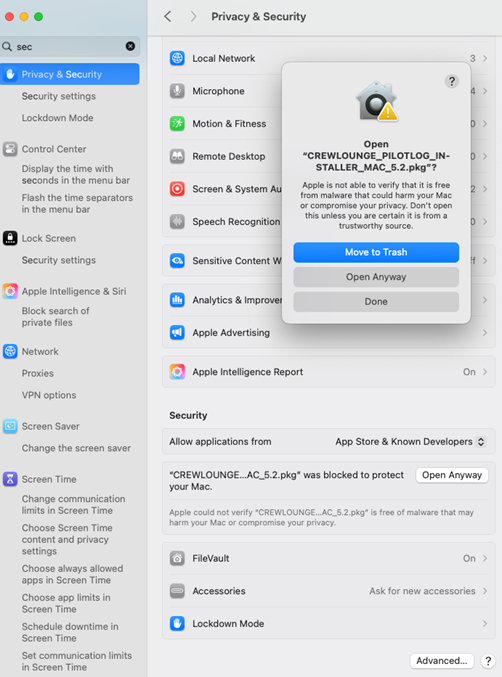
Installation Blocked by MacOS
macOS may block the CrewLounge PILOTLOG installer. If this happens, go to System Settings > Privacy & Security and click “Open Anyway” (see Image 1) to continue the installation.
Was this article helpful?
That’s Great!
Thank you for your feedback
Sorry! We couldn't be helpful
Thank you for your feedback
Feedback sent
We appreciate your effort and will try to fix the article